
Manually assigning leads is a way of the past. Pipedrive offers an efficient way to assign leads automatically, making sure each one goes to the best sales rep based on criteria you define.
New to Pipedrive?
 Claim Your 30-day Free Trial!
Set up your Team
If you want any version of “round-robin” assignment, where leads are distributed evenly among a group of sales reps, start by creating a team for that group.
- Click your icon in the top right corner.
- Select Manage users.
- Click Team filters. (Or follow this link to go straight there.)
- Create a team by clicking the + Team button, completing the pop-up form, and clicking Save.
Set the Automatic Assignment Rules
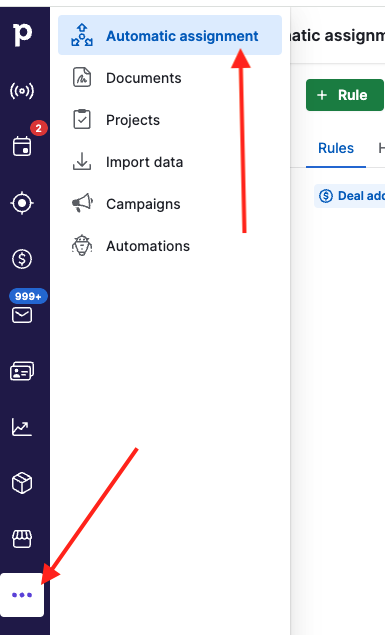
- In the left-hand sidebar, click Automatic assignment (or follow this link).
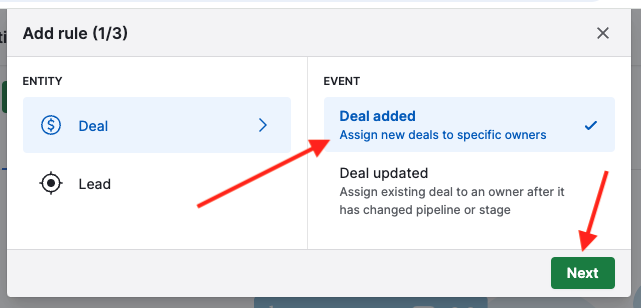
- Add a rule, for example Deal added, and click Next.
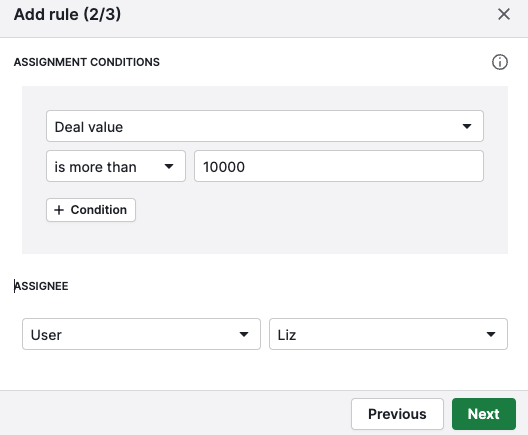
- On the next page, choose the criteria for this assignment rule. For example, if the deal value is more than a certain amount, the deal could always be assigned to your most experienced sales rep. That would look something like this:
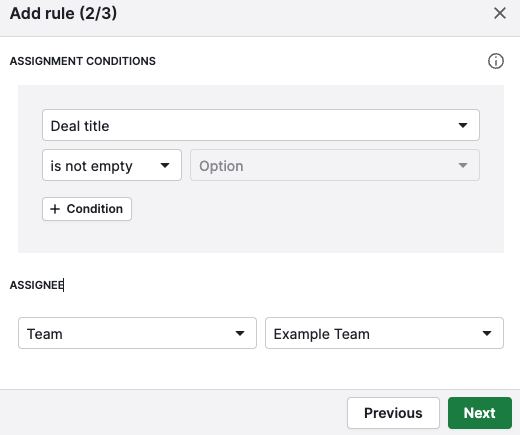
Or maybe you just want all deals assigned round-robin. In that case, you could set the rule so that if the deal title is not empty, the deal is assigned to the team you created above. That would look like this:
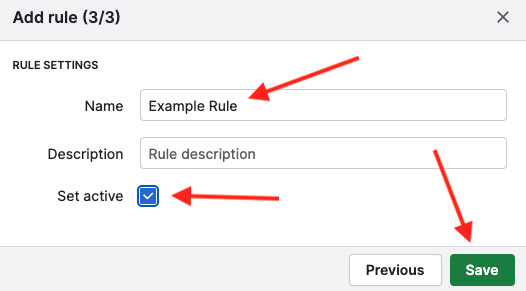
- On the final page, name your rule, check the box to set it to active, and click Save.
Create as many rules as you'd like, set their priority, and voilà: leads are routed without you having to lift a finger!
Want a hand setting up your Pipedrive automations?
Pipedrive is a powerful CRM that can be a game changer for your business. If you're serious about making more sales, book a working session and we'll teach you everything you need to know.
Book a Working Session