
For those in sales, one of the worst things you could do is miss an appointment. It makes you look unorganized and unprofessional. It may even cost you a sale.
Calendly makes booking and keeping track of appointments easy. When information from Calendly gets integrated with Pipedrive, you have a clearer view of where a client is in the sales pipeline and the ability to create automation around your meetings. The Calendly + Pipedrive Zapier integration is one of my favorites.
Here's what we'll cover:
- What is Calendly?
- Why use Calendly with Pipedrive?
- How the Calendly + Pipedrive Zapier integration works
- How to get started using Calendly with Pipedrive
 Claim Your 30-day Free Pipedrive Trial
Prefer to watch? Press play and I'll walk you through the setup steps covered at the end of this article.
What is Calendly?
Calendly offers a hub for scheduling meetings professionally and efficiently. You set your availability and share your booking links so that meetings can get scheduled quickly, without sending multiple messages or emails back and forth.
In addition to scheduling appointments, Calendly lets you set up pre- and post-meeting automations like email or text reminders, thank-you emails, and requests for follow-up meetings. The team features provide even greater flexibility, with meeting types set across the organization and “round robin” scheduling options.
Why use Calendly with Pipedrive?
When you integrate Pipedrive and Calendly, the information Calendly gathers can seamlessly sync into Pipedrive. Meeting attendees become Pipedrive contacts. Appointments get recorded as activities. If there are changes or cancellations, both applications get updated.
This saves a lot of time and extra steps. Gone are the days of copy-pasting information from one application to another, or flipping between applications when you get an email asking to reschedule.
How the Calendly + Pipedrive Zapier integration works
At its core, when a prospect books an appointment using Calendly, Zapier will automatically:
- Find or Create & Update the prospect's Deal in Pipedrive
- Send calendar invites and confirmation emails
- Send appointment reminders
- React, as needed, if the appointment is cancelled or rescheduled
Here's a basic process map outlining how this automation can work:
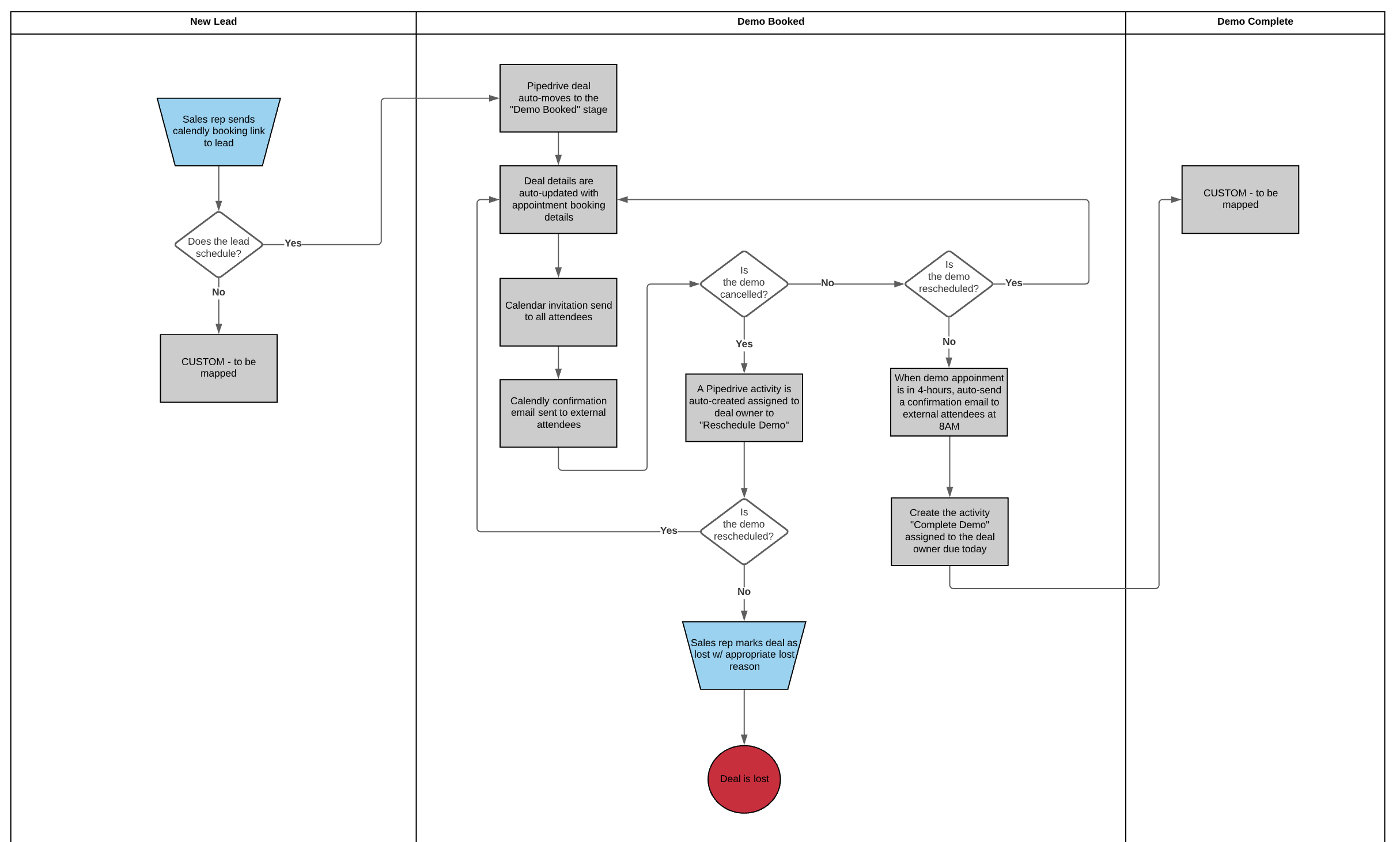
And here's what that map looks like in action:
Here's what I love most about this integration:
- 0 friction scheduling
- Your sales reps stay in the know about bookings, cancellations, and reschedules.
- In a snap, all Pipedrive users can see exactly how prospects are progressing through your pipeline.
How to get started using Calendly with Pipedrive
Ready to integrate Calendly with Pipedrive? Here's how to get started:
- Step 1: In Zapier, click Create Zap and select Calendly as the trigger app. For the trigger event, select Invitee Created or Rescheduled.
- Step 2: In step two, select Pipedrive and Find Persons. Search for the person using the email submitted to Calendly.
- Step 3: In step three, select Pipedrive and Create Deal to create a new deal for the Calendly booking.
Pro tip:
- In Step 2, check the box “Create Pipedrive Person if it doesn't exist yet?” to convert that step into a “Find or Create Person in Pipedrive” action.
- Want to update an existing Deal? Change Step 2 to a code step where you find Open Deals in a particular stage/pipeline connected to a person with the email from Step 1. Then in Step 3, Update the Deal instead!